







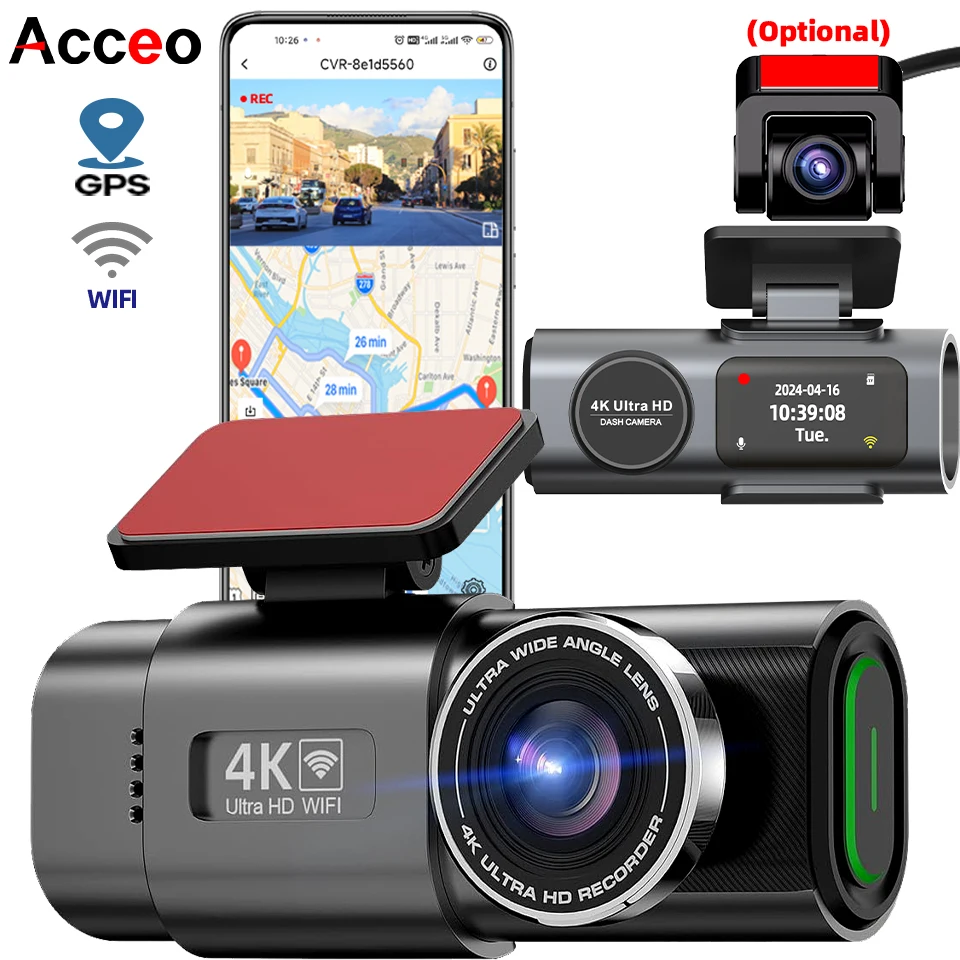
Every year, millions of traffic incidents go unresolved simply because there is no clear evidence of what actually happened. Insurance fraud alone accounts for an estimated USD 20 billion in false claims annually in the United States, and hit-and-run accidents affect tens of thousands of drivers each year. A quality dash cam is no longer a niche gadget for tech enthusiasts — it has become an essential tool for any driver who wants protection against false claims, indisputable evidence for insurance purposes, and a reliable witness on the road. The 4K UHD Dash Cam with night vision, built-in WiFi, GPS support, and 24-hour parking monitoring represents the current sweet spot in the dash cam market: professional-grade features at an accessible price point. In this comprehensive guide, we explore what makes a great dash cam, how to choose the right one for your needs, and why a 4K recording system like this model is worth the investment.
Why Every Driver Needs a Dash Cam in 2026
The global dash cam market was valued at approximately USD 4.5 billion in 2025 and is projected to grow at a compound annual growth rate (CAGR) of 8.2 percent through 2033, according to industry analysts. This growth is driven by several converging factors: increasing traffic density in urban areas, rising awareness of insurance fraud schemes, the proliferation of rideshare and delivery drivers who rely on vehicles for income, and the decreasing cost of high-resolution camera sensors. In 2025 alone, over 60 million dash cams were sold worldwide, with the United States, China, and Germany representing the three largest markets.
The primary value proposition of a dash cam is straightforward: it records everything that happens in front of (and optionally behind) your vehicle while driving. If you are involved in an accident, you have video evidence showing exactly what occurred — who was at fault, what the road conditions were like, and how events unfolded second by second. This evidence can be the difference between a straightforward insurance payout and a protracted legal battle. Insurance companies in many regions now offer premium discounts of 5-15 percent for drivers who install and use dash cams, recognizing the reduction in disputed claims and fraud.
Beyond accident evidence, dash cams serve other valuable purposes: they record scenic road trips (4K footage of mountain passes and coastal highways looks stunning on a home screen), they monitor your parked vehicle for vandalism or hit-and-run incidents, and they provide training material for new drivers or fleet managers. For rideshare drivers (Uber, Lyft, Didi), a dash cam is practically mandatory — it protects both the driver and passengers in the event of disputes or false accusations.
4K UHD Dash Cam: Complete Specifications and Performance Analysis
The 4K UHD Dash Cam we are reviewing pairs a high-resolution Sony IMX415 image sensor with a wide-aperture lens, delivering true 4K (3840 x 2160) recording at 30 frames per second. At this resolution, license plates are clearly readable at distances up to 15-20 meters in daylight conditions, road signs are legible, and the overall scene detail is dramatically better than 1080p or 2K alternatives. The difference between 1080p and 4K in a dash cam context is not merely cosmetic — at 1080p, a license plate becomes unreadable at roughly half the distance compared to 4K, which can mean the difference between identifying a fleeing vehicle or having useless footage.
The night vision system uses an advanced low-light sensor (Sony STARVIS technology in high-end versions) combined with wide dynamic range (WDR) processing. This allows the camera to capture clear footage in conditions as dim as 0.01 lux — roughly equivalent to moonlight. In practical terms, this means the camera can still read license plates in parking lots at night and capture usable footage on unlit roads. The WDR feature handles challenging lighting transitions smoothly, such as when emerging from a tunnel into bright sunlight or facing oncoming headlights at night.
Storage is handled via MicroSD card, supporting capacities up to 256GB. At 4K resolution at 30fps, a 256GB card provides approximately 10-12 hours of continuous recording before loop recording begins overwriting the oldest footage. The G-sensor automatically locks recordings when impact is detected, preventing critical clips from being overwritten. A 64GB card is recommended as the minimum practical capacity for daily driving.

Smart AI Translation Bluetooth Earphones With LCD Display Noise Reduce New Wireless Digital Long Battery Life Display Headphone
Ai Translator Earbud Device Real Time 2-Way Translations Supporting 150+ Languages For Travelling Learning Shopping Business
TV98 ATV X9 Smart TV Stick Android14 Allwinner H313 OTA 8GB 128GB Support 8K 4K Media Player 4G 5G Wifi6 HDR10 Voice Remote iptv
Built-in WiFi, GPS, and Smartphone Integration
Modern dash cams have evolved far beyond simple “point-and-shoot” recording devices. The built-in WiFi module in this 4K dash cam connects directly to your smartphone via a dedicated app, allowing you to view live footage, download recordings, and adjust camera settings without removing the SD card. This is a genuinely useful feature — after an incident, you can immediately pull the relevant video clip onto your phone and share it with insurance adjusters or law enforcement officers right at the scene.
The GPS module logs your vehicle’s location coordinates, speed, and route in real time, overlaying this data onto the recorded video. This metadata is invaluable for fleet management, verifying delivery routes, contesting speeding tickets (by providing proof of actual speed), and documenting exact incident locations. The GPS data is embedded in the video file and can be viewed on a computer using the desktop playback software or directly in the smartphone app via a Google Maps overlay.
The smartphone companion app — compatible with both iOS and Android — serves as the primary interface for configuration after the initial setup. Through the app, you can adjust video resolution, toggle parking mode sensitivity, set G-sensor thresholds, manage storage, and update firmware. The app also supports multi-camera setups if you install a rear-facing or interior camera alongside the main unit.
24-Hour Parking Monitoring: Protection Even When You Are Away
One of the most compelling features of this dash cam is its 24-hour parking monitoring capability. Using a combination of motion detection and impact sensing (G-sensor), the camera automatically starts recording when it detects movement near your vehicle or an impact to the body. This feature requires the dash cam to be hardwired to your vehicle’s fuse box (a professional installation recommended) or connected to an external battery pack to avoid draining your car’s starter battery.
Parking monitoring covers several common scenarios: If another vehicle hits your parked car and drives off, the impact triggers recording and the clip is locked. If someone approaches your vehicle and attempts a break-in, the motion-activated mode starts recording. If a shopping cart rolls into your door, the G-sensor captures the moment. All locked clips are stored in a protected folder that loop recording will not overwrite.
In parking mode, the camera enters a low-power standby state to conserve battery. When triggered, it wakes up within 1-2 seconds and begins recording. A hardwiring kit with low-voltage cutoff protection ensures your car battery never drops below a safe starting level — typically set at 11.8V or 12.0V depending on your preference. For drivers who park on the street or in shared lots, this feature alone can save thousands in insurance deductibles and repair costs.
How to Choose the Right Dash Cam: A Practical Buyer’s Guide
With hundreds of dash cam models on the market ranging from USD 20 budget units to USD 500 professional systems, choosing the right one requires matching features to your specific needs. Here is a decision framework based on common use cases:
Daily commuters: If you drive in city traffic every day, prioritize a dash cam with 4K resolution, wide dynamic range, and reliable night vision. The 4K UHD Dash Cam covered in this guide fits perfectly. Look for a 170-degree or wider lens to capture multiple lanes of traffic. GPS logging is very useful for documenting your commute route and speed.
Rideshare and delivery drivers: Your needs go beyond front-facing recording. Consider a dual-channel system (front + rear camera) or a 3-channel system that includes an interior camera. Interior recording protects against passenger disputes and provides documentation for delivery confirmations. Higher storage capacity (128GB+) is essential for long shifts. The 4K front camera with WiFi sharing is ideal for this use case.
Fleet managers: Look for dash cams with cloud connectivity, real-time GPS tracking, driver behavior monitoring, and fleet management software integration. While the consumer-grade 4K dash cam can work for small fleets, enterprise operations should investigate dedicated fleet dash cam systems from brands like Samsara, Lytx, or Garmin.
Budget-conscious buyers: If you cannot justify a 4K system, a good 1080p dash cam from a reputable brand (Viofo, Garmin, Nextbase) in the USD 50-100 range still provides significant protection. Prioritize Sony sensor-based cameras with parking mode support and capacitor-based power (which handles heat better than lithium batteries in parked vehicles).
Parking-focused protection: If your primary concern is protecting a vehicle that sits parked on the street for long periods, prioritize a dash cam with excellent parking mode, a hardwiring kit option, and a capacitor-based power system that can handle extreme temperatures. Some premium dash cams offer buffered parking mode that records 10-15 seconds before the trigger event — worth the premium if parking protection is your top priority.
Installation Guide and Best Practices
Installing a dash cam is a straightforward DIY project for most drivers, but a clean installation that hides the power cable and positions the camera optimally requires some planning. Here is a step-by-step guide:
Step 1: Position the camera. Mount the dash cam behind the rearview mirror on the passenger side. This position gives you a clear view of the road without obstructing your vision. The camera should be centered laterally and high enough that the hood occupies only the bottom 15-20 percent of the frame. Test the angle by reviewing a test recording.
Step 2: Route the power cable. Tuck the USB power cable along the headliner (the gap between the windshield and ceiling liner), down the A-pillar weather stripping, behind the glove box, and to the cigarette lighter port or fusebox. Use a plastic trim tool to gently push the cable into the gaps — do not force it. Most modern cars have enough space along the headliner and A-pillar for the cable to fit without visible gaps.
Step 3: Choose your power source. For simplest installation, plug into the 12V cigarette lighter port. For a cleaner look with no visible cables, use a hardwiring kit that connects to your fusebox and provides constant power for parking mode. Many hardwiring kits include low-voltage protection to prevent battery drain.
Step 4: Configure the camera. Insert a high-endurance MicroSD card (32-256GB), format it in the camera, and adjust settings: enable loop recording (3-minute segments recommended), set G-sensor to medium sensitivity, enable parking mode if hardwired, and configure WiFi and GPS settings through the app.
Step 5: Test and maintain. Take a test drive and review footage quality. Check that the date/time stamp is correct (GPS will auto-set if enabled). Clean the windshield area under the mount periodically. Format the SD card every 2-4 weeks in the camera to maintain file system integrity.
Frequently Asked Questions
Q: Is it legal to use a dash cam while driving?
Dash cams are legal in most countries, but regulations vary. In the United States, dash cams are legal in all 50 states, though some states have restrictions on windshield mounting (height and position). In the European Union, the GDPR requires that dash cam footage is not continuously broadcast or stored indefinitely. In Germany and Austria, dash cam footage may not be admissible as primary evidence in court in all cases. Always check local regulations before installation.
Q: What SD card should I use with a 4K dash cam?
For 4K dash cams, use a high-endurance MicroSD card rated for continuous recording. Standard SD cards can fail within months due to the constant write cycles of dash cam use. Recommended: Samsung Pro Endurance, SanDisk High Endurance, or Kingston Industrial cards in 64GB-256GB capacities. Look for cards with U3/V30 speed class rating to handle 4K video bandwidth.
Q: Will a dash cam drain my car battery?
When the car is running, the alternator powers the dash cam and charges the battery simultaneously — no drain risk. When parked, a hardwired dash cam in parking mode draws approximately 50-200mA depending on the model. A quality hardwiring kit with low-voltage cutoff (typically set at 11.8V) will stop power draw before your battery drops below starting capacity. Without hardwiring, the camera only runs when the accessory power port is active.
Q: How long does a 256GB card record in 4K?
A 256GB MicroSD card records approximately 10-12 hours of continuous 4K video at 30fps on this dash cam before loop recording begins overwriting the oldest footage. At 1080p resolution, the same card would record approximately 30-40 hours. The actual recording time depends on the bitrate setting — higher bitrate yields better quality but uses more storage per minute.
Q: Can a dash cam overheat in summer?
Yes, heat is the number one enemy of dash cams. Interior car temperatures can reach 60-80°C (140-176°F) on a sunny summer day. This dash cam uses a capacitor-based power system instead of a lithium battery, which handles extreme temperatures much better. However, the camera’s internal components still have thermal limits. If you park in direct sunlight, consider a dash cam with a higher operating temperature range (rated for at least 65°C/149°F) and use a reflective windshield sunshade.
Related Articles
Learn more about product sourcing and selling automotive accessories:
- How to Find Reliable Suppliers for Your Small Business — Find trustworthy manufacturers for dash cams and car electronics.
- A Small Items Sourcing Plan That Delivers Profit — Source winning automotive accessories for your ecommerce store.
- eBay vs Amazon vs Etsy: Best Marketplace for Car Electronics — Find the right channel to sell dash cams and auto accessories.