
An iPad keyboard case is the single most important accessory for anyone who wants to use their iPad as a laptop replacement. Whether you are a student taking lecture notes, a professional typing emails on the go, or a content creator drafting scripts during travel, the right keyboard case transforms a media-consumption device into a genuine productivity tool. The Magic Keyboard Case for iPad 11th/10th Generation represents the latest generation of this product category, featuring smart magnetic attachment, a full QWERTY keyboard, multi-angle viewing, and comprehensive front-and-back protection — all at 55% OFF, bringing the price to EUR 47.09 (down from EUR 104.78). In this complete buying guide, we cover everything from compatibility and key features to comparison with Apple’s own Magic Keyboard, so you can find the perfect iPad keyboard case for your workflow and budget.
iPad Keyboard Case Compatibility — Which Models Work?
Compatibility is the most important factor when choosing an iPad keyboard case, and it is also where buyers most frequently make mistakes. The Magic Keyboard Case discussed in this guide is designed for the following iPad models:
- iPad 11th Generation (2025): The latest budget iPad with the A16 chip, featuring an 11-inch display and USB-C connectivity. Model numbers include A3354, A3355, and A3356.
- iPad 10th Generation (2022): The previous generation iPad with 10.9-inch Liquid Retina display, USB-C, and landscape front camera. This model was a major redesign and shares the same physical dimensions as the 11th Gen.
- iPad A16 (2025): The newest iPad model featuring Apple’s A16 Bionic chip for improved performance and efficiency.
Important compatibility check: iPad keyboard cases are model-specific. A case designed for the iPad Pro 11-inch will NOT fit the iPad 10th or 11th Generation, and vice versa. The iPad 10th and 11th Gen share the same physical footprint (248.6 x 179.5 x 7 mm), so this single keyboard case works for both. Other models like the iPad Air (both M1 and M2), iPad Pro (11-inch and 12.9-inch), and iPad mini require different cases. Always verify compatibility with your specific iPad model before purchasing.
| iPad Model | Model Numbers | Compatible |
| iPad 11th Gen (2025) | A3354, A3355, A3356 | ✅ Yes |
| iPad 10th Gen (2022) | A2696, A2757, A2777 | ✅ Yes |
| iPad Air 11-inch (M2/M3) | A2901, A2902, A3110 | ❌ No |
| iPad Pro 11-inch (M4) | A2836, A2837, A3007 | ❌ No |
| iPad Mini (A17 Pro) | A2993, A2994, A2996 | ❌ No |
Key Features Breakdown: What Makes a Great iPad Keyboard Case?
The Magic Keyboard Case for iPad 10th/11th Gen includes a comprehensive set of features that define a quality iPad keyboard case. Understanding each feature’s importance helps you evaluate whether a case meets your needs:
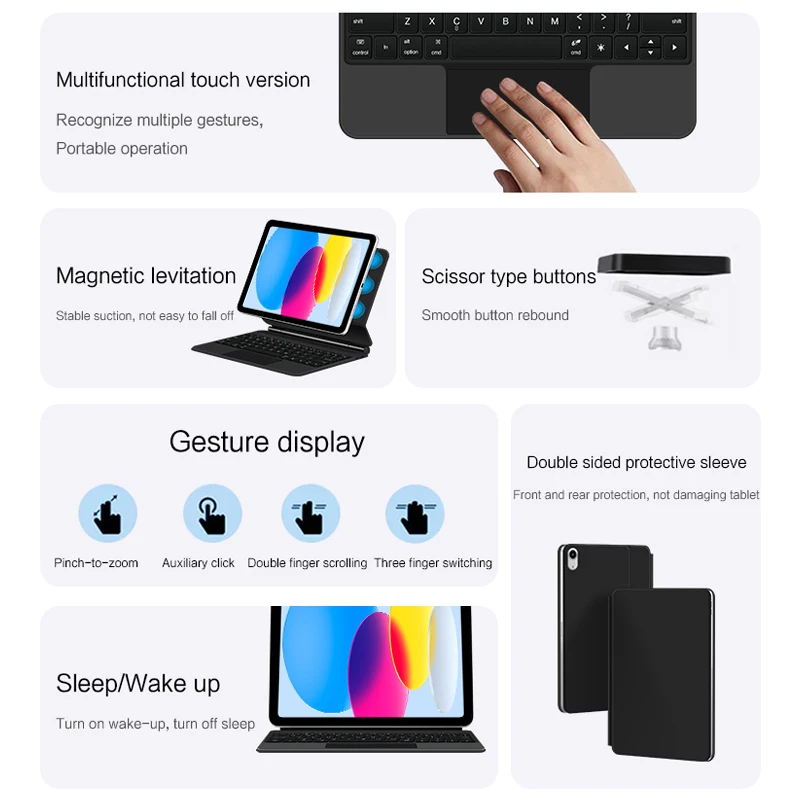
Full QWERTY Keyboard: The most essential feature. A complete keyboard layout with island-style keys, standard key spacing, and approximately 1.3mm of key travel provides a typing experience close to a MacBook or ultrabook laptop. The keyboard connects via the iPad’s Smart Connector (no Bluetooth pairing required in most cases, though some cases offer Bluetooth as a fallback). Shortcut keys for brightness, volume, media playback, and screen lock are standard inclusions that improve daily workflow efficiency.
Smart Magnetic Attachment: The case uses strong embedded magnets to hold the iPad securely in place. The magnetic connection should be strong enough that you can hold the case by the iPad portion without the two separating. This magnetic system allows quick detachment for handheld iPad use — simply pull the iPad out of the keyboard base for tablet mode, then snap it back in when you need to type.
Multi-Angle Stand: A 180-degree book-style hinge that supports multiple viewing angles. The best cases offer tilt adjustment from about 15° (typing position) to 60° (viewing/video position). Some cases also offer a tent mode for media consumption. The hinge should be stiff enough to hold the angle under typing pressure but smooth enough to adjust with one hand.
Auto Sleep/Wake: The case includes the smart cover functionality pioneered by Apple. When you close the case, the iPad automatically goes to sleep. When you open it, the iPad wakes instantly. This simple feature saves significant battery over time and eliminates the need to press the power button multiple times per day.
Full Protection: A quality keyboard case provides 360-degree protection — the front cover protects the screen during transport, and the keyboard base protects the back. The material (typically PU leather exterior with microfiber interior lining) should be durable enough for daily commutes and occasional drops. Precise cutouts for the camera, speakers, charging port, and buttons are essential for full functionality.
TV98 ATV X9 Smart TV Stick Android14 Allwinner H313 OTA 8GB 128GB Support 8K 4K Media Player 4G 5G Wifi6 HDR10 Voice Remote iptv
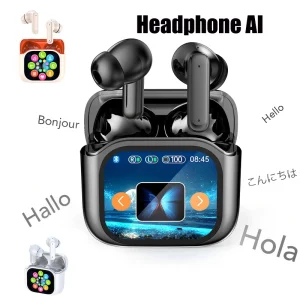
Smart AI Translation Bluetooth Earphones With LCD Display Noise Reduce New Wireless Digital Long Battery Life Display Headphone
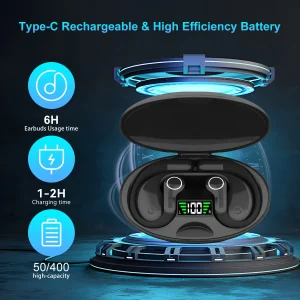
Ai Translator Earbud Device Real Time 2-Way Translations Supporting 150+ Languages For Travelling Learning Shopping Business
iPad Keyboard Case vs. Apple Magic Keyboard: Can Third-Party Cases Compete?
The premium option in the iPad keyboard case market is Apple’s own Magic Keyboard, which retails for $249-349 depending on the iPad model. A third-party case like this Magic Keyboard Case for iPad 10th/11th Gen costs a fraction of that — EUR 47.09 at current pricing. The question is: where does the third-party case compromise, and where does it deliver comparable value?
Typing Experience: Apple’s Magic Keyboard uses a scissor mechanism with 1mm key travel, backlit keys, and a floating cantilever design. Third-party cases typically use membrane or standard scissor switches with similar key travel. For most users, the typing experience on a quality third-party keyboard case is 85-90% as good as Apple’s, and the difference is only noticeable in side-by-side comparison. The keys are slightly less crisp, but not enough to impact typing speed or accuracy.
Build Quality: Apple uses premium materials — aluminum palm rest, polyurethane exterior, dedicated USB-C pass-through port. Third-party cases use PU leather and ABS plastic. Apple’s case feels more premium in hand, but the third-party case offers better drop protection due to its full-wrap design (Apple’s Magic Keyboard leaves the sides and back of the iPad exposed).
Portability and Weight: The Magic Keyboard Case for iPad 10th/11th Gen is a folio-style all-in-one design. Apple’s Magic Keyboard uses a two-piece design (keyboard base + separate back cover) that adds more bulk. The third-party case is lighter and more portable, making it a better choice for students and commuters who carry their iPad throughout the day.
Price-to-Value: The value argument is decisive. At EUR 47.09 (55% off), the third-party case delivers 90% of the Apple Magic Keyboard experience at 15-20% of the cost. For most users — especially students and budget-conscious professionals — the third-party case is the smarter financial choice. The savings can be put toward an Apple Pencil, screen protector, or other accessories that enhance the iPad experience more than a premium keyboard alone would.
Productivity Use Cases — Maximizing Your iPad with a Keyboard Case
An iPad with a keyboard case becomes a versatile productivity device. Here are the most common and effective use cases based on user surveys and reviews:
Students and Note-Taking: The iPad + keyboard case combo has become the default student device setup at many universities. Apps like GoodNotes and Notability handle handwritten notes, while the keyboard case enables fast typing for essays, emails, and research papers. The ability to detach the iPad for reading PDFs and textbooks, then reattach for typing, makes this the most flexible student setup available — more portable than a laptop, more capable than a tablet alone.
Remote Work and Video Calls: The multi-angle stand is critical for video conferencing. With the case in the 45-60° viewing position, the iPad’s front-facing camera is at the ideal height for Zoom, Teams, FaceTime, and Google Meet calls. The keyboard remains usable for typing chat messages or taking notes during calls. The landscape camera orientation on the 10th/11th Gen iPad (the camera is on the landscape edge) means video calls look natural rather than off-axis.
Content Creation: Bloggers, social media managers, and content creators use the iPad + keyboard case as a mobile editing station. The keyboard handles text input while the touchscreen handles photo editing (Lightroom Mobile, Pixelmator) and video editing (DaVinci Resolve, LumaFusion). The A16 chip in the 11th Gen iPad handles demanding creative tasks smoothly.
Travel and Commuting: An iPad in a keyboard case is lighter and more compact than any laptop. For airplane tray tables, coffee shop counters, and commuter train seats, the folio form factor is ideal. When the keyboard is not needed, folding the case closed turns the iPad into a compact media consumption device for movies and reading.
Frequently Asked Questions About iPad Keyboard Cases
Q: Does the Magic Keyboard Case work with a screen protector installed on my iPad?
Yes. The case is designed to accommodate most standard screen protectors (tempered glass or PET film) without interference. The Smart Connector alignment and magnetic attachment points are positioned away from the screen edges, so a screen protector does not affect functionality. Some users also apply a matte paper-feel screen protector for an improved writing experience with the Apple Pencil, and this also works fine with the case.
Q: Is the keyboard backlit?
Most third-party iPad keyboard cases at this price point do not include backlit keys. Backlit keyboards add significant cost ($15-20 to the BOM) and are primarily found in cases priced above $60-70. For typing in low-light conditions, the iPad’s screen brightness provides enough ambient light for most users to see the keys. If backlighting is essential for your workflow (e.g., typing in dark rooms regularly), look specifically for “backlit keyboard case” in the product description.
Q: Is the keyboard rechargable or does it draw power from the iPad?
Most modern iPad keyboard cases for the 10th/11th Generation iPad connect through the Smart Connector, which provides both data and power. This means the keyboard draws power from the iPad and requires no separate charging. The power draw is minimal — using the keyboard for 8 hours per day consumes approximately 2-3% of the iPad’s battery. Cases that connect via Bluetooth (used for older iPad models or when Smart Connector is unavailable) require periodic charging via USB-C.
Q: Does the case protect the Apple Pencil?
Most iPad keyboard cases do not have a dedicated Apple Pencil holder or charging slot. The iPad 10th/11th Gen supports the first-generation Apple Pencil (with a USB-C adapter) or the USB-C Apple Pencil, which attach magnetically to the iPad’s side. Some cases include a side loop or flap to secure the Pencil, but this is not a standard feature. If you carry your Apple Pencil regularly, consider a case with an integrated Pencil holder or use a separate Pencil sleeve.
Q: Can I still use the iPad’s rear camera with the case on?
Yes. Quality keyboard cases include a precise cutout for the rear camera module. The iPad 10th/11th Gen has a single rear 12MP camera that protrudes slightly from the back. The case’s camera cutout is raised (bump-style) to accommodate this protrusion, allowing the iPad to lie flat on surfaces while protecting the camera lens. The cutout is large enough to avoid lens flare or obstruction in photos.
Final Verdict: Is an iPad Keyboard Case Worth Buying?
An iPad keyboard case is the single best productivity upgrade you can make for your iPad. At EUR 47.09 (55% off the original EUR 104.78), the Magic Keyboard Case for iPad 10th/11th Gen delivers compelling value by combining a full keyboard, adjustable viewing angles, auto sleep/wake, and comprehensive protection in one lightweight package. While it does not match Apple’s Magic Keyboard for premium materials, it delivers 90% of the functionality at less than 20% of the cost — a trade-off that makes sense for most users.
For students, professionals, and content creators who use their iPad for typing-intensive tasks, a quality keyboard case pays for itself in increased productivity within the first month of use. The difference between typing on an on-screen keyboard versus physical keys is transformative — your typing speed doubles, errors decrease, and the iPad genuinely becomes a laptop replacement rather than just a tablet.
For importers and e-commerce sellers, iPad keyboard cases represent a high-demand accessory category with strong year-round sales. iPad accessories consistently rank among the top-selling categories on Amazon, and the keyboard case segment has grown in step with iPad adoption in education and enterprise markets. The key to success in this category is accurate compatibility labeling — many customer returns result from buyers purchasing cases for the wrong iPad model. Clear, prominent compatibility information in your listing title and description reduces returns and improves customer satisfaction.
Related Articles:
- From Random Products to Reliable Sales: A Small Items Sourcing Plan That Delivers Profit — Learn how to evaluate tablet accessories as part of your product sourcing strategy.
- How to Find Reliable Suppliers for Your Small Business in Under Two Weeks — Source quality iPad keyboard cases from verified electronics accessory suppliers.
- The Importer’s Cost Calculation Workbook: 7 Hidden Traps That Inflate Your Landed Costs — Calculate accurate landed costs when importing keyboard cases and other tablet accessories.